当 AI 记错一个下划线:一次 Godot 4.5 UI 调试的意外启示
好久没有写 godot 相关文章了,最近看到 4.5 版本已出,就又鼓捣了点东西。
环境
- Windows 11
- godot 4.5
问题
我这次的设想是做一个 UI,上下左右都保留为侧边栏,中间是主体部分。 最初的想法是 HBox 和 VBox 套来套去。后来 AI 提醒我, 一层 3x3 的 Grid Container 就可以做到了,内部的元素使用 Panel,我想想有道理, 于是从善如流:
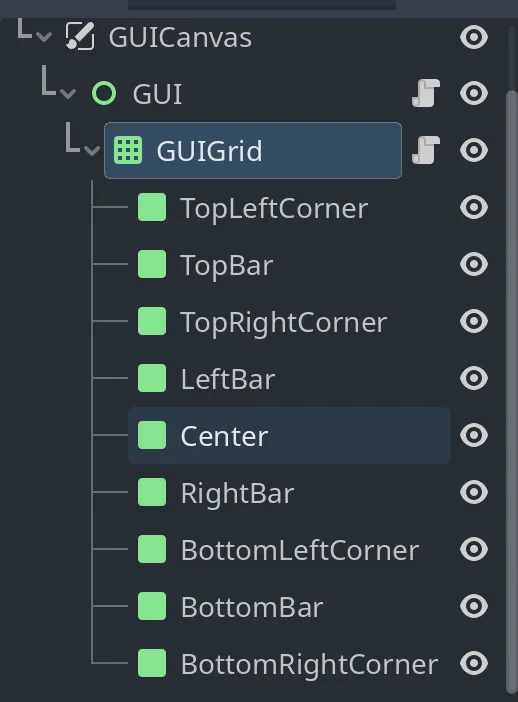
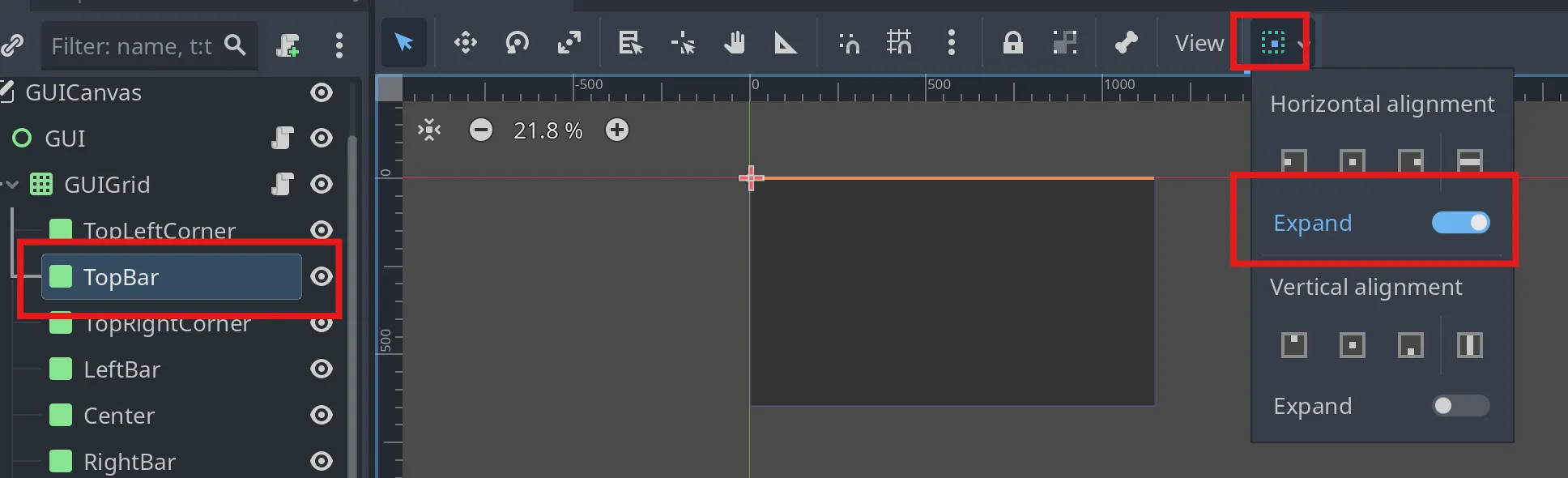
这个是纯体力活,另外因为 Bar 要占满除角落以外的全部空间, 所以要设定对应方向的 expand,比如 TopBar:
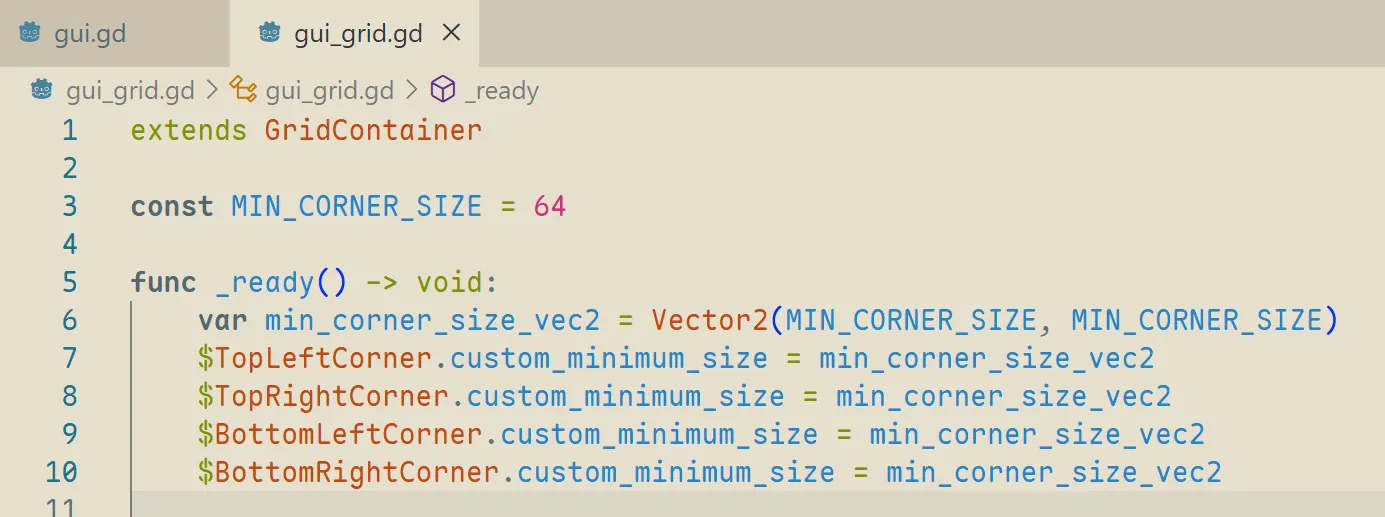
四个角落,我们先简单一点,设个最小尺寸好了,这个我在代码中完成, 因为比较方便修改常量:
运行一下看看:
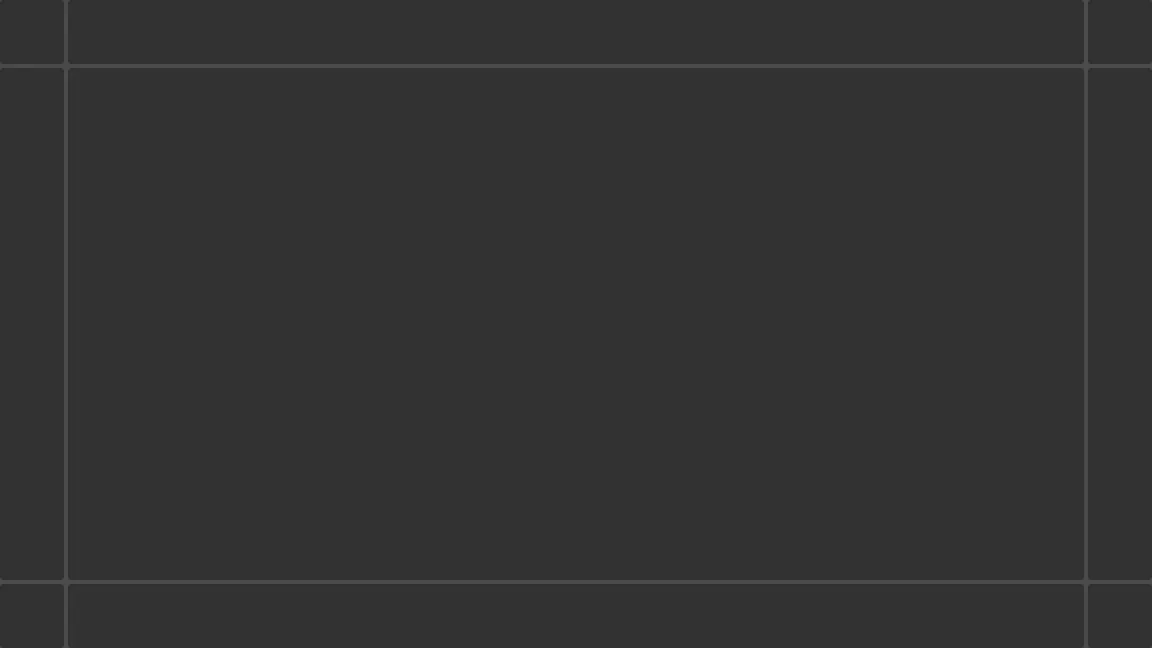
形状符合我们的预期,但是这几根线是怎么回事,谁留下的边界线呢,作为一个独狼用户, 我只能去求助各大模型。
分析
基本上,各大模型的意见相似:你放了九个 panel 上去,每个panel 预设都有边界, 要把边界去掉:
chatGPT: 你看到的那条“线”,其实不是
GridContainer自己画的, 而是 Panel 默认的主题样式(StyleBoxFlat或StyleBoxTexture)渲染出来的边框。
那么对症下药的方子也都差不多:
extends GridContainer

func _ready() -> void:
    # 创建一个没有边框的 StyleBoxFlat
    var no_border_style := StyleBoxFlat.new()
    no_border_style.bg_color = Color(0, 0, 0, 0) # 背景透明(可改成任意颜色)
    no_border_style.set_border_width_all(0)      # 去掉边框

    # 遍历子节点,如果是 Panel 就替换样式
    for child in get_children():
        if child is Panel:
            child.add_theme_stylebox_override("panel", no_border_style)
毫无疑问,问题没有解决,因为解决了就没有这篇,我开始向 AI 投诉问题, 事情开始发散起来,我就纯「人工」地给大家「智能」总结一下 AI 在意的点:
- 你观察到的“边界线”,其实并不是 边框(border),而是 相邻 Panel 背景色之间的间隙。
GridContainer的separation值StyleBoxFlat的抗锯齿属性- Godot 3/4 的兼容性
- border / margin 都要设 0
- 等一帧
有些点是有从属性的,也就是从某一点延申出来,不过我都打成同一级别了, 因为这些都不重要,它给出的代码都没有达到预期的效果, 试来试去最后的代码大概长这个样子:
extends GridContainer

const MIN_CORNER_SIZE = 64
func _ready() -> void:
		var min_corner_size_vec2 = Vector2(MIN_CORNER_SIZE, MIN_CORNER_SIZE)
		$TopLeftCorner.custom_minimum_size = min_corner_size_vec2
		$TopRightCorner.custom_minimum_size = min_corner_size_vec2
		$BottomLeftCorner.custom_minimum_size = min_corner_size_vec2
		$BottomRightCorner.custom_minimum_size = min_corner_size_vec2

		self.add_theme_constant_override("hseparation", 0)
		self.add_theme_constant_override("vseparation", 0)

		var colors = [
				Color.RED, Color.GREEN, Color.BLUE, Color.ALICE_BLUE, Color.BISQUE,
				Color.BLUE_VIOLET, Color.BROWN, Color.DARK_CYAN, Color.CRIMSON
		]
		var index = 0
		# 遍历子节点,如果是 Panel 就替换样式
		for child in get_children():
				if child is Panel:
						var stylebox = StyleBoxFlat.new()
						# 移除所有边框
						stylebox.set_border_width_all(0)
						# 移除所有边距
						stylebox.set_content_margin_all(0)
						stylebox.set_expand_margin_all(0)
						# 设置背景色
						stylebox.bg_color = colors[index]
						index += 1
						child.add_theme_stylebox_override("panel", stylebox)

    # 等几帧让 Container 完成布局,然后把 position/size 四舍五入为整数像素
    #(有时需要多等一帧,视你的层级深度而定)
    await get_tree().process_frame
    await get_tree().process_frame

    for child in get_children():
        if child is Panel:
            # Godot 4:不要用 rect_position/rect_size,改用 position / size
            child.position = child.position.round()
            child.size = child.size.round()
解决
我最后看了看代码,然后望着 godot 编辑器的界面发了会儿呆,感觉我看出了什么端倪:
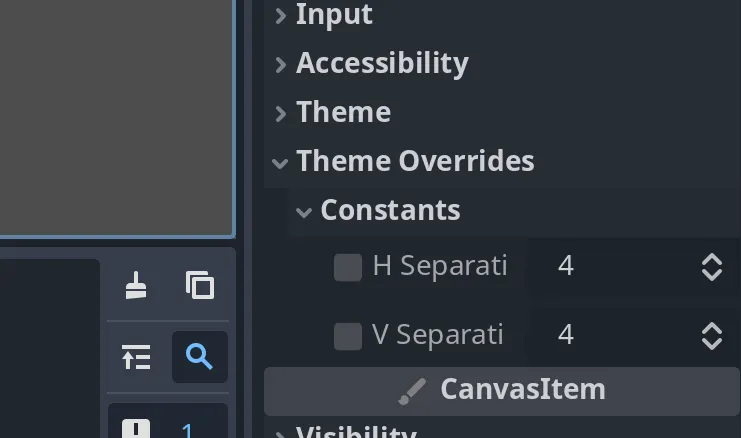
转头看代码:
		self.add_theme_constant_override("hseparation", 0)
		self.add_theme_constant_override("vseparation", 0)
我觉得是 AI 把属性名记错了,于是赶紧改了改试下(我去掉了 panel 的颜色):

问题解决!而且其实前面一大堆抗锯齿、border、margin 都没什么用处, 去掉也是没有分界线,所以就是 separation 的问题,只是 AI 记错了属性名, 但是我不知道这个细微的错误,结果后面楼越来越歪,我最后的代码是这样子:
extends GridContainer
const MIN_CORNER_SIZE = 64
func _ready() -> void:
    var min_corner_size_vec2 = Vector2(MIN_CORNER_SIZE, MIN_CORNER_SIZE)
    $TopLeftCorner.custom_minimum_size = min_corner_size_vec2
    $TopRightCorner.custom_minimum_size = min_corner_size_vec2
    $BottomLeftCorner.custom_minimum_size = min_corner_size_vec2
    $BottomRightCorner.custom_minimum_size = min_corner_size_vec2
    self.add_theme_constant_override("h_separation", 0)
    self.add_theme_constant_override("v_separation", 0)
总结
什么领先业界、百亿千亿参数、训练一次百万千万美的模型,还没有我发呆有用。
开玩笑了,其实我只是想说,老话说尽信书不如无书,我想上过学的应该都知道, 这个道理我想也可以完全应用到 AI 这个地方, 但是我老是遇到各种各样推崇 AI 可以解决任何事情的人, 就很难理解他们为什么会抱有这样的理念,要是真的 AI 可以解决任何事情, 我可能先向 AI 问问,有什么办法可以不上班还有钱花。当然了,我想它会给我一个答案, 只是我不敢试。